
Skip to content

AI Resume Builder & CV Maker

Build a CV That Gets You Hired

Build an ATS-ready CV with AI-assisted content, professional formatting, and ATS-tested templates — ready to send in minutes.

  • ATS-Optimized Templates
  • AI-Powered Content Suggestions
  • One-Click Section Selection
  • Export to PDF, Word & Email

No credit card required · Free to build, edit & preview

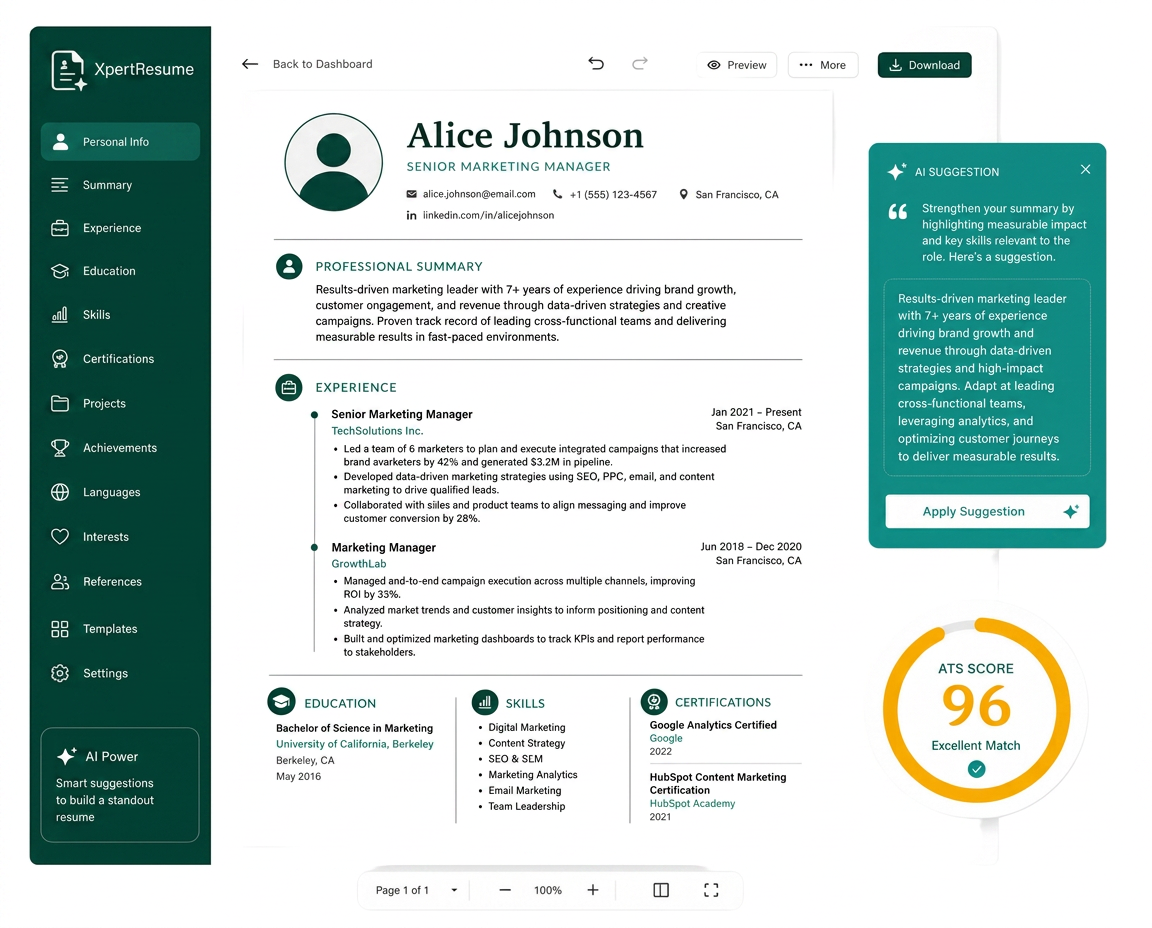
XpertRes CV editor showing a resume being refined with an AI suggestion and ATS match score
Headshot of the candidate on the resume being edited

Built for professionals across every industry

  • Engineers
  • Designers
  • Teachers
  • Developers
  • Marketers
  • Freelancers
Professional templates, all ATS-optimized
16Professional templates, all ATS-optimized
Industry template families
10Industry template families
Export options: PDF, Word, Email
3Export options: PDF, Word, Email

Templates

Industry-Leading Templates

ATS-optimized designs, professionally crafted to help you stand out and get noticed by recruiters.

View All Templates

How it works

How to build a resume in 3 easy steps

Putting together a resume has never been easier. XpertRes fills in your information and formats it into an HR-approved template you can download in minutes — so you start applying sooner.

  1. Step 1

    Quickly generate content for your resume

    Click pre-written bullets and skills, or let the AI assistant write a custom summary — XpertRes does the writing so you don't have to.

    Start with your job title and the builder loads a guided outline for that role: contact details, a summary, experience, education and skills. Every field carries an example, so you always know the level of detail recruiters expect. As you fill sections in, the progress ring updates and the AI assistant suggests achievement-style bullet points you can accept, reword or ignore. Nothing is locked in — you can rewrite any line at any point, and your work saves automatically as you go.
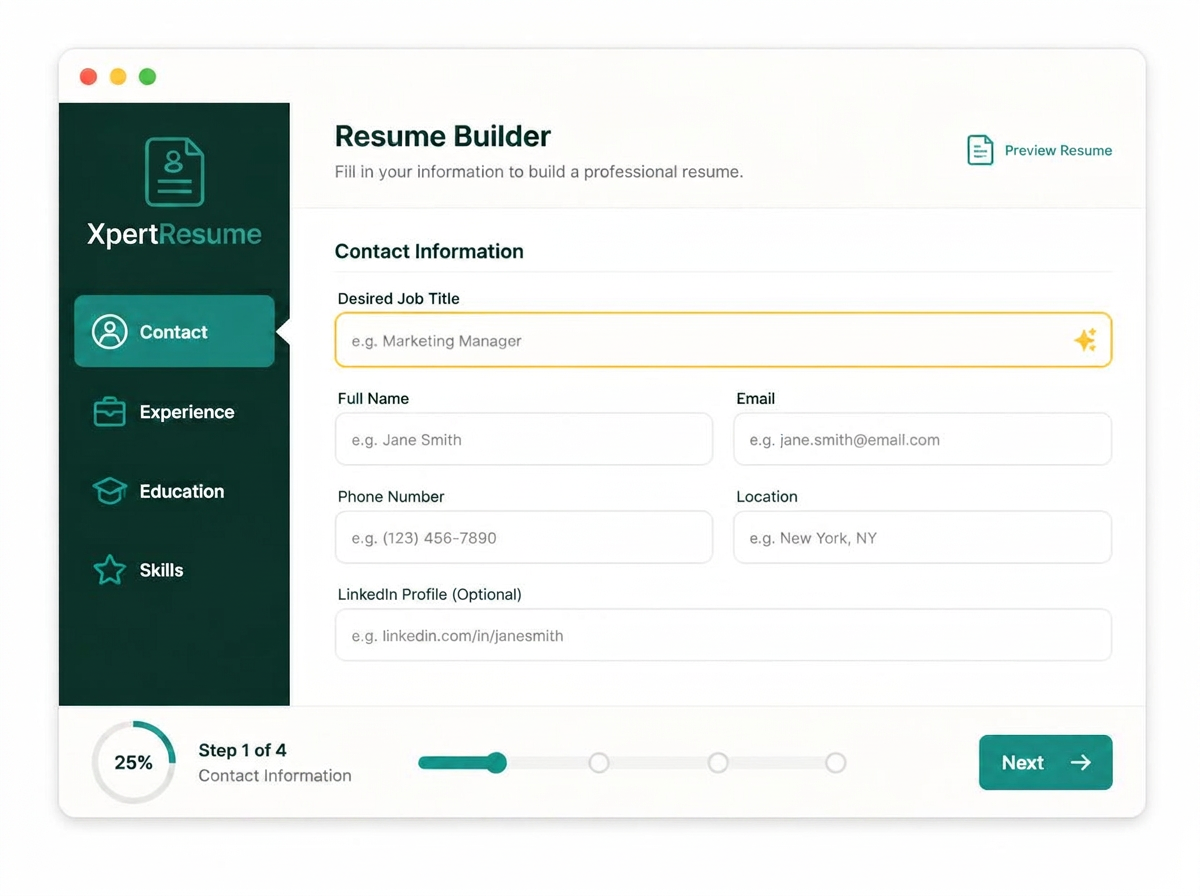
    XpertRes builder form with guided sections and a job title field
    • Guided sections with live progress tracking
    • One-click achievement bullets per job title
    • AI summaries tuned to your seniority
    • Autosave on every keystroke, no lost drafts

    Key resume sections

    • Header
    • Summary
    • Experience
    • Education
    • Skills
    • Certifications
    • Projects
    • Languages
  2. Step 2

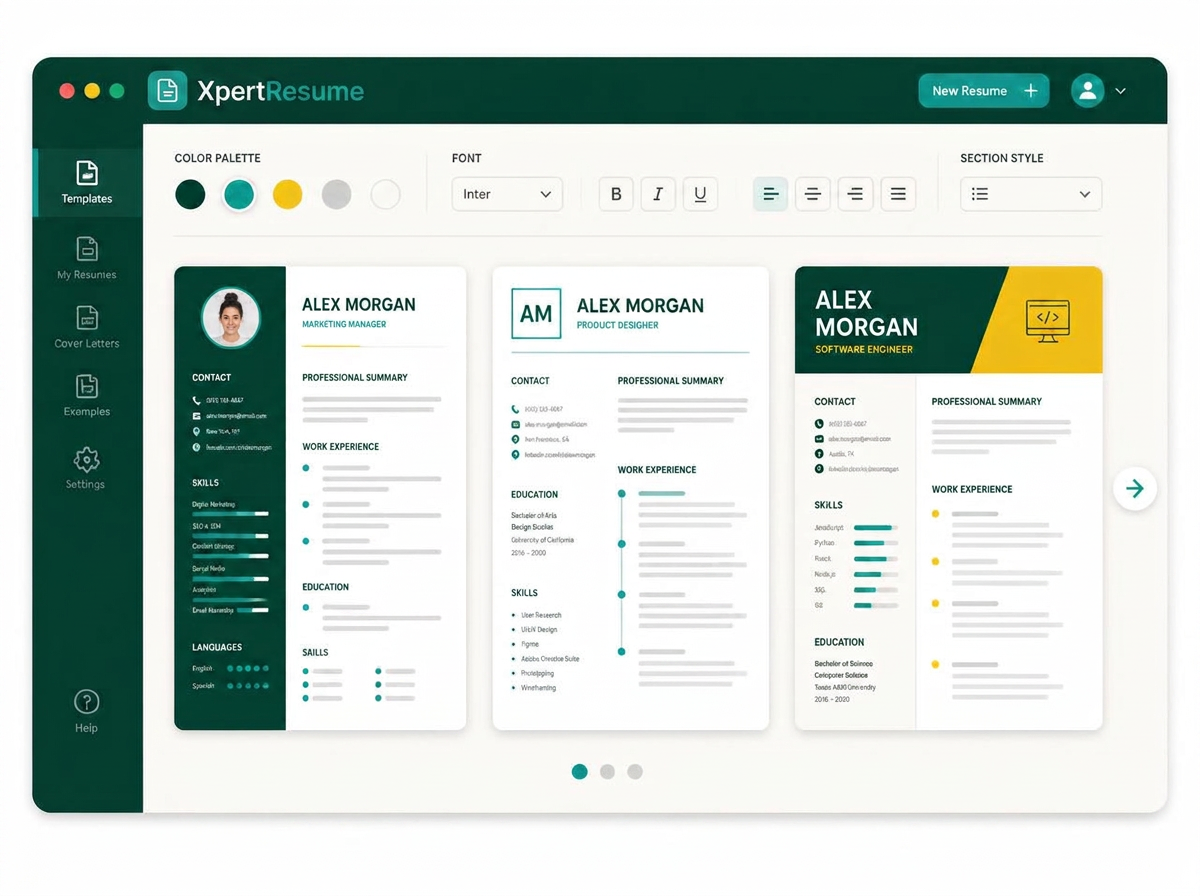
    Select a professionally designed resume template

    See how your resume looks in different layouts and pick the template that fits the job you want and your professional background.

    Your content is stored separately from the design, so switching templates never rewrites a single word. Preview a classic single-column layout for corporate roles, a split layout that puts skills up front for technical roles, or a modern layout with space for a photo and portfolio links. Colour, font and section spacing all live in one panel, and every combination stays inside consistent typography standards — so a design change can never quietly break how a parser reads your resume.

    XpertRes template gallery showing three resume layouts side by side
    • Swap templates without losing a single line
    • Consistent, professional typography and spacing
    • Colour, font and section styling in one panel
    • Preview each layout before you commit

    Template styles

    • Professional
    • Modern
    • Creative
    • Simple
    • With photo
    • Two column
  3. Step 3

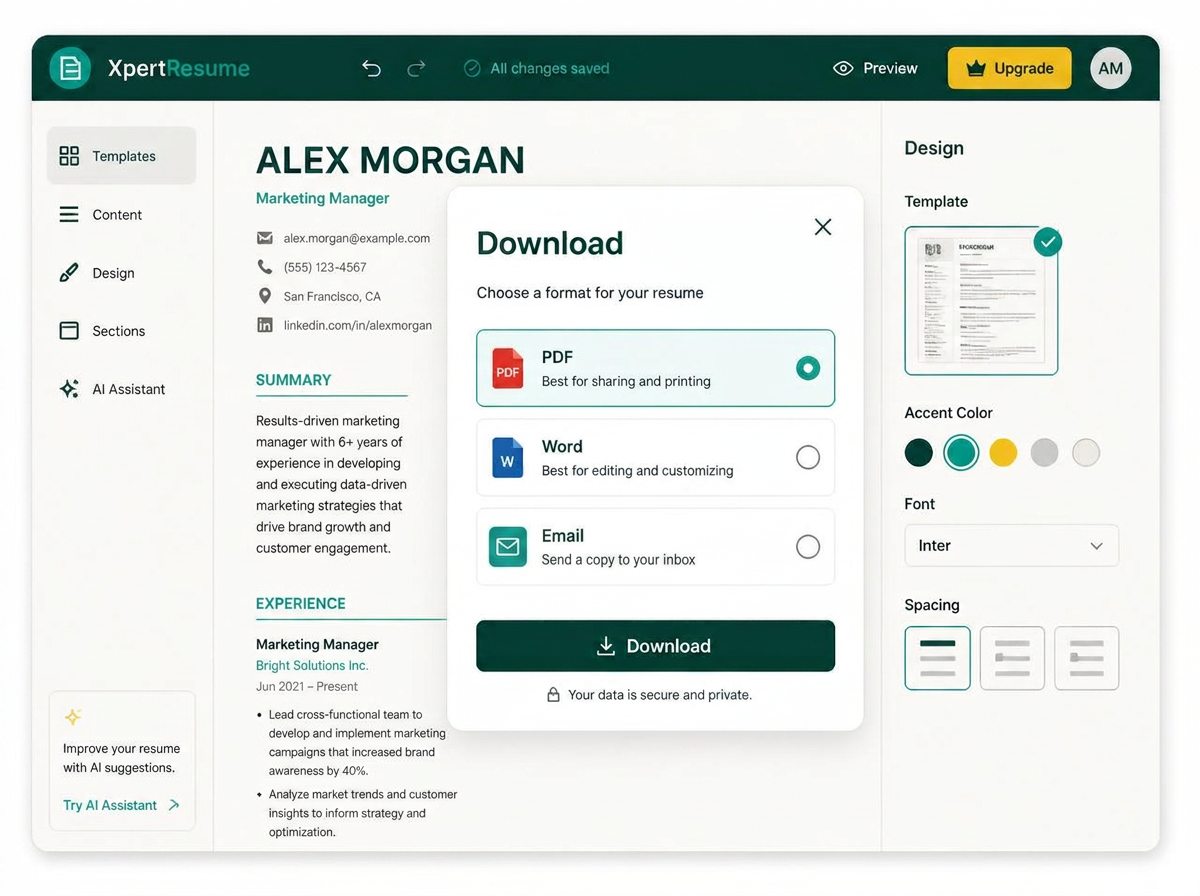
    Download it as PDF, Word — or get it by email

    When your resume is ready, choose how you want it delivered: download a print-perfect PDF, download an editable Word document, or have a copy sent straight to your email inbox.

    The PDF keeps selectable, parser-friendly text so applicant tracking systems read every line correctly, and the Word file stays fully editable if a recruiter or agency asks for changes. Prefer to keep a copy safe? Choose the email option and XpertRes sends the finished resume to your inbox as an attachment, ready to forward to an employer from your own address. You can come back and export again in any format later — every version stays in your account.

    XpertRes download dialog offering PDF, Word and email delivery
    • Print-perfect PDF with selectable, ATS-safe text
    • Editable Word (.docx) file for recruiter tweaks
    • Emailed copy delivered straight to your inbox
    • Re-export any format later, free of charge

    Delivery options

    • PDF
    • Word (.docx)
    • Email to inbox
  4. See it in action

    Watch the full flow end to end

    A short walkthrough from the first blank section to an export-ready resume — no fluff, just the real product in real time.

    See exactly how the AI turns a rough work history into polished, recruiter-ready bullet points, how the template updates live as you type, and how the whole thing comes together for export in under two minutes.

    • See the editor and template update in real time
    • Watch AI rewrite a bullet point live, before and after
    • Follow the export flow from click to downloaded file

    Runtime

    • 1:47 min
    • No sign-up needed
    • Sound on for narration

Features

Why Job Seekers Choose XpertRes

Free to build. Pay only when you download.

Build your CV for FREE

Creating, editing, and updating on XpertRes costs nothing — every template is unlocked, resume import is free, and new accounts get 3 free AI generations. You only pay when you're ready to download, and that download comes with a free matching cover letter.

  • No subscriptions, ever — just pay per download
  • All templates unlocked and ATS-optimized
  • Free resume import, plus 3 AI generations on signup

Transparent by design: pay only for the downloads you actually use — pay-as-you-go, never a subscription. Full pricing details live on the pricing page.

  • Build & edit — 100% free

    Create, edit, and update unlimited CVs and cover letters with every template unlocked, plus a free import of your existing resume to get started faster.

  • 3 free AI generations

    New accounts get three AI-powered generations at no cost — see your CV take shape before you ever pay a cent.

  • Pay per download, not monthly

    Only pay when you're ready to download — no subscription, ever. Every paid download includes one free cover letter for that same resume.

  • Earn points, unlock free downloads

    Refer a friend and earn 5 points instantly. When they pay for a download, you earn more. Reach 100 points and your next download is free.

How referral rewards work

  1. 1Share your personal referral link from your dashboard.
  2. 2Earn 5 points the moment a friend signs up — and more when they pay for a download.
  3. 3Reach 100 points and redeem them for a free download.

Credits never expire while your account is active.

Resources

Career guidance that goes beyond the CV

Straight-talking guides on resumes, interviews, job searching, and using AI without losing your voice.

FAQ

Frequently asked questions

Quick answers to the questions we hear most. If you need more help, reach out through our contact form.

Contact

Talk to the XpertRes team

Questions about templates, pricing, or your account? Send us a message and we'll get back to you.

  • SupportAnswers within one business day
  • Product feedbackTell us what your job search needs next

We only use your details to reply to this message.